

If you’d like to change your password, there are two easy ways to do it:
Option 1: Change your password after logging in #
If you already know your password and can log in:
- Log in to the Strength Training web app.
- Click your user icon in the top-right corner.
- Select My Profile.
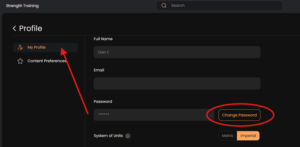
- Click Change Password.
- Enter your new password and save the changes.
The screenshot below shows where to find the Change Password button.
Option 2: Forgot your password? #
If you can’t log in, you can reset your password from the login screen.
- Open the Muscle & Motion web app or mobile app.
- Click or tap Forgot Password.
- Enter the email address associated with your account.
- We’ll send you a secure password reset link.
Still need help? #
If you don’t receive the password reset email or continue to experience issues, please contact our support team at info@muscleandmotion.com, and we’ll be happy to help.